
One stream, four platforms.
Open a streamer room in RookTalk. Your stream reaches the people in the room and, if you like, YouTube, Twitch, Kick and Facebook at the same time. Your viewers can chat in the room and send you gifts.
Live streams come with Premium and above. Streaming to platforms is done from the Windows app.
- Four platforms at onceYouTube, Twitch, Kick, Facebook or an RTMP address of your own
- Camera or screenYou choose which one the stream shows
- Three sound sourcesYour microphone, the voices in the room and the computer sound, each with its own level
- Your keys stay with youYour stream keys stay on your own computer
How you go live
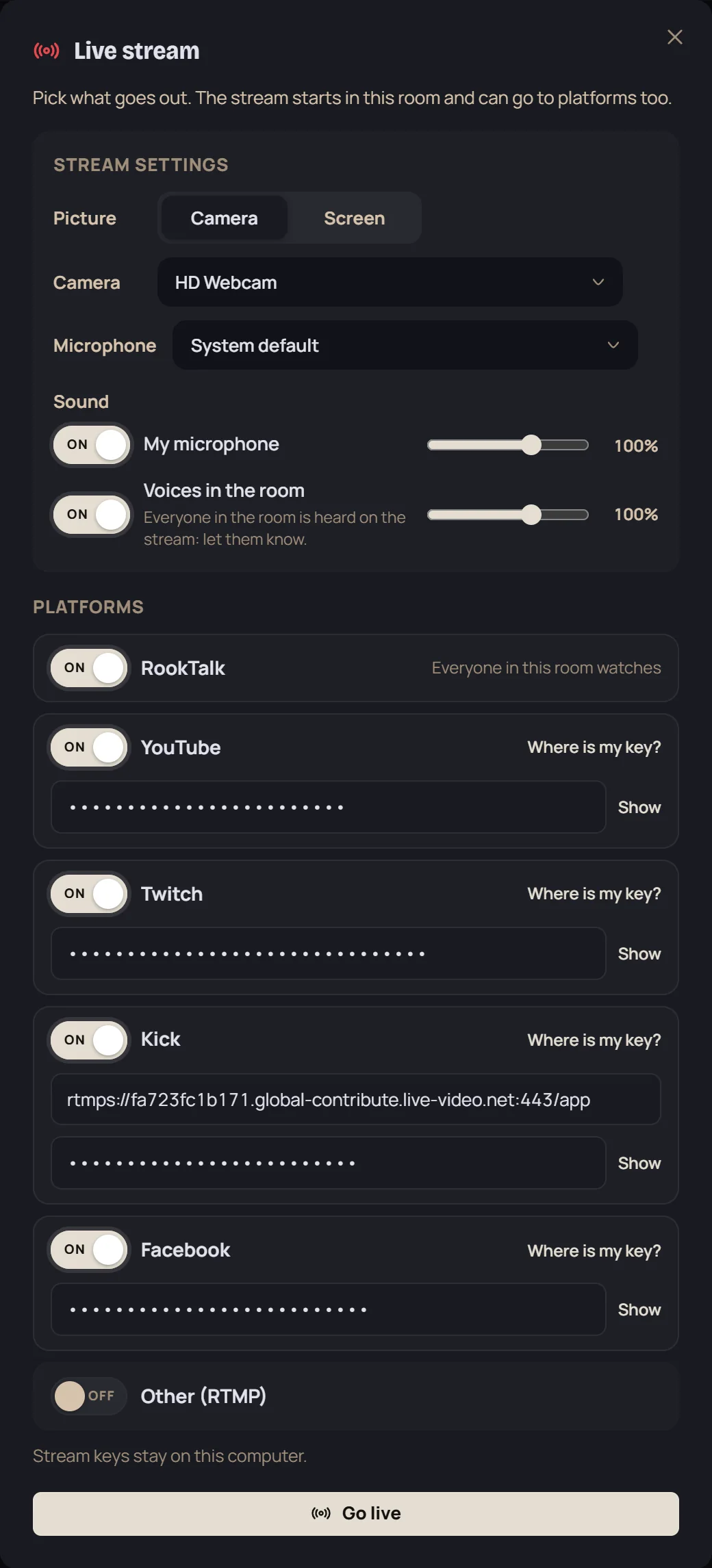
You need no separate streaming program: the stream starts inside the room you are talking in. The window beside this text is the app's own Live stream window.
- Open a streamer roomWhen you open a room, choose Streamer as its type. People who come in join muted.
- Turn on your platformsIn the Live stream window, turn on the platforms you want and enter the stream key of each.
- Choose picture and soundPick your camera or your screen, and set the level of your microphone and of the voices in the room.
- Go liveThe stream starts in this room and goes to the platforms you turned on at the same time. You can change the levels while you are live.
Gifts from your viewers
Viewers in the room can send a gift from their account balance to a streamer whose camera or screen share is on. The gift appears with an animation on the screen of everyone in the room.
 Heart$1
 Coffee$2
 Trophy$5
 Rocket$10
 Crown$20
 Golden Rook$50
What you need to stream
- The Premium or the Private plan. Opening a streamer room and going live come with these plans.
- The Windows app. Streaming to platforms is done from RookTalk on Windows. On a Mac and on the phone the stream goes to the RookTalk room only.
- A stream key for each platform. You get it from the platform's own stream settings; the window has a link that shows where to find it.
What is heard on the stream
- Your microphone. You can switch to another microphone while you are live.
- The voices in the room. If you turn this on, everyone in the room is heard on the stream: let them know.
- Computer sound. The sound of games, the browser and other programs.
Download now
Runs on 64-bit Windows 10 and 11. The installer is digitally signed and the app updates itself.
Gift pictures: Fluent Emoji by Microsoft (MIT license). The Golden Rook is RookTalk's own drawing.